Show prices in USD (US Dollar)? You can change this at any time at the top of the page.

Reparation-drone.com

0Cart0,00 €
News

DJI Firmware Update, November 2026: What to Know Before You Install

Published on November 28, 202611 min read

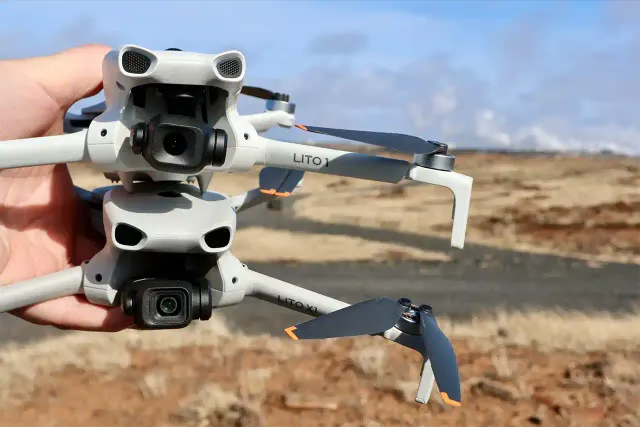
On November 13, 2026, DJI rolled out a new wave of firmware for its consumer lineup. Eight aircraft are listed by UK distributor Heliguy: Air 3S, Mini 4 Pro, Mini 5 Pro, Mavic 4 Pro, Avata 360, Avata 2, Neo 2 and Lito X1. This November 2026 DJI firmware update brings no new features, but it requires the latest version of the DJI Fly app and, on several models, it can wipe settings you care about: camera parameters on some, return-to-home altitude and max distance on others. So before you tap "Update," it pays to know what you're in for.

This article sums up, as of November 24, 2026, what is established and what remains unclear, then walks through the routine we recommend for installing these versions without unpleasant surprises and for responding if the installation goes wrong. The information comes from the roundups published by Heliguy and by the specialist site DroneXL, both of which relied on DJI's release notes. Where the two sources differ, we point it out.
November 2026 DJI firmware update: the list of affected drones

Heliguy covered the entire wave in its roundup of DJI firmware for November 2026, noting that each version "fixes some known issues." DroneXL, in an article dated November 14, says it found release notes dated November 13 for "at least seven" drones. The two lists match, version numbers included, with one exception: the Lito X1 does not appear in DroneXL's coverage. Its inclusion in this wave, with version v01.00.0600, therefore rests on Heliguy alone for now. Nothing indicates it's a mistake, nothing confirms it either, and Lito X1 owners will see in DJI Fly anyway whether a new version is offered to them.

The following table lists, model by model, the aircraft firmware version and the reset warning flagged in the release notes, as reported by both outlets.

DroneAircraft firmwareSettings that may be reset
Air 3Sv01.00.1900No warning
Mini 4 Prov01.00.1200No warning
Mini 5 Prov01.00.0900Camera settings
Mavic 4 Prov01.00.1000Camera settings
Avata 360v01.00.0900Flight parameters, including RTH altitude and max distance
Avata 2v01.00.0600Flight parameters, including RTH altitude and max distance
Neo 2v01.00.0900Flight parameters, including RTH altitude and max distance
Lito X1v01.00.0600 (Heliguy only)Camera settings (Heliguy only)

What does this firmware fix? DJI isn't saying

Anyone hoping for new features will be disappointed. The "What's New" section of the Air 3S release note is a single line, "Fixed some known issues," and DroneXL notes that none of the seven release notes it reviewed specifies what was fixed. Under these conditions, there's no way to know whether these versions address a transmission glitch, a stabilization problem or a simple display bug. This lack of detail is nothing new. For the Air 3S, it's the fourth update of the year, after those of April 23, July 30 and October 20, 2026, and all of them are limited to fixes. According to DroneXL, the last version for this drone to announce a concrete change dates back to v01.00.0600 on December 5, 2024.

Should you rush to install it, then? Nothing that has been published presents these versions as urgent. DroneXL's editor-in-chief recommends writing down your RTH altitude and camera settings, then installing when you have the time to check everything afterward. That's our take too. A bug-fix update is meant to be installed, since the manufacturer's fixes apply to the latest version, but it doesn't have to be done the night before a shoot or in the parking lot of a flying site, with your phone tethered and a half-empty battery.

DJI Fly 1.21.18 update: the mandatory first step

All of the November 13 versions require DJI Fly v1.21.18, on both iOS and Android, DroneXL notes. In other words, until the app is at that level, there's no point trying to install the drone's new firmware. On Android, the mirror site APKMirror posted the version 1.21.18 file on October 27, 2026. Its changelog mentions new Highlight Slow-Mo and Helix Close-Up modes for the Neo 2, along with fixes, for a 709.53 MB file that requires at least Android 7.0. Since APKMirror is not an official source, these details still need to be confirmed by DJI, particularly the release date and the specifics of the new features.

DroneXL also observes that the app went from v1.21.16 to v1.21.18 in 24 days. Its editor suggests that app releases are what trigger these waves of firmware, while presenting this himself as a guess. Whether or not it holds up, it encourages a healthy habit: every time DJI Fly updates, it's wise to check right away whether the drone and its remote controller are also waiting on a new version, rather than finding out when you're about to take off.

DJI Mini 5 Pro, Mavic 4 Pro and Lito X1 update: camera settings go back to zero

On the Mini 5 Pro and the Mavic 4 Pro, the release notes, relayed by both Heliguy and DroneXL, warn that camera parameters are reset after installation. Heliguy adds the Lito X1 to this list, with no possible confirmation from DroneXL, which doesn't cover this model. That said, the warning wouldn't be new for this small drone: the DJI release note for Lito X1 v01.00.0200, dated April 23, 2026, already contained this caution and advised rechecking settings in DJI Fly.

For a casual pilot who leaves the camera on auto, the loss is minor. It's much less so for someone who has built a precise setup: color profile, resolution and frame rate, manual exposure, photo format. It's precisely the most demanding Mavic 4 Pro and Mini 5 Pro users who have fine-tuned these parameters, and a flight launched without noticing the return to factory defaults can end with footage that's unusable in editing. The fix comes down to two steps: screenshot every settings screen before the update, then review everything on the ground before your next takeoff.

Avata 360, Avata 2 and Neo 2 firmware: check your RTH altitude before flying

For these three drones, the warning concerns flight parameters, notably return-to-home (RTH) altitude and max distance, which may be reset to their default values. Heliguy recommends writing them down before installing, and DroneXL confirms this, mentioning "distance limits." This isn't the Avata 360's first time: its v01.00.0800 from October 20, 2026 already carried the same warning, according to the October firmware roundup published by Heliguy.

In our view, this is the most important point of this entire wave. RTH altitude is a safety setting: it sets the height the drone climbs to before heading back to its home point when return-to-home kicks in. If it reverts to the factory value, it may no longer suit the terrain where you usually fly, whether that's a wooded edge, steep terrain or buildings. DJI doesn't phrase it this way, it's a conclusion drawn from our workshop, but it's common sense: a return-to-home flown too low toward obstacles taller than the drone is a crash scenario repair technicians know well. For Avata 360 owners, whose behavior we covered in detail in our Avata 360 review, as for Avata 2 and Neo 2 owners, the rule is simple: no first flight after the update without checking these two values. Max distance deserves the same attention, if only to make sure it still matches how you use the aircraft.

Mini 4 Pro firmware: the first update since November 2025

The Mini 4 Pro makes something of a comeback in this wave. Its v01.00.1200 is its first update since November 2025, a point on which Heliguy, DroneXL and DroneDJ agree. The previous version, v01.00.1100, dated from November 5, 2025, and DroneDJ had covered it on November 6, 2025, noting that it required DJI Fly v1.19.0 at the time. The drone therefore went a full year without new firmware, and anyone still on the app version required last year will have a sizable gap to close before they can install this one.

Good news for this model: its release note contains no reset warning, and neither does the Air 3S's. Heliguy also lists the remote controller versions paired with v01.00.1200: v10.00.0900 for the DJI RC 2, v01.01.0300 for the RC-N2, v01.01.0400 for the RC-N3 and v01.00.0900 for the RC Pro 2. For the Air 3S, DroneXL states that the four remote controller versions listed are identical to October's. However, we found no reliable source on the remote controller versions paired with the other six drones. The safest approach is to check in DJI Fly, once the aircraft and its remote controller are connected, whether an update is also offered for the controller. And if your Mini 4 Pro has racked up flight hours since last year, this update is also a good opportunity to inspect the propellers, arms and gimbal; our DJI Mini 4 Pro spare parts cover the components that wear out the most.

How to safely update your DJI drone

DJI documents the update procedure in each aircraft's manual and on its website, and that's where you should look up the minimum battery level required, which we don't list here since we haven't verified it model by model. Retailer Coptrz, discussing the Lito X1, restates a basic rule: keep the drone and remote controller powered on until the process is complete. In addition, here's the routine we recommend in our workshop. It comes from hands-on experience, not from DJI guidance.

  1. Screenshot every settings screen in DJI Fly: camera, safety (RTH altitude, max distance and max altitude), controls and transmission.
  2. Update DJI Fly to version 1.21.18 before doing anything else.
  3. Fully charge the flight batteries and the remote controller, setting aside any worn or swollen battery; our replacement batteries let you start fresh.
  4. Leave a microSD card in the drone and make sure you have a stable internet connection.
  5. Start the installation on the ground, indoors, without handling or disconnecting the aircraft until the completion message appears.
  6. After the restart, check the installed version, compare each setting against your screenshots, and only take off once the RTH altitude has been confirmed.

DJI Assistant 2 software, which connects to a computer via USB, is cited by Coptrz as an alternative to the app. It can help out when the wireless update stubbornly refuses to complete, but we found no documentation specifying which models it supports for this wave.

Failed DJI drone update: what to do

Let's be upfront: DJI's official procedure after a failure, as well as the possibility of rolling back to an earlier firmware version, aren't covered in the sources we were able to review. So we won't promise any rollback. General workshop experience does, however, suggest a few principles. An installation interrupted by a dying battery, a network outage or a disconnection doesn't mean the drone is broken. In that case, turn off the drone and remote controller, recharge the batteries, make sure DJI Fly is on 1.21.18, then restart the process under better conditions. If it keeps failing through the app, DJI Assistant 2 over USB is the next option.

If, on the other hand, the drone no longer initializes, if the gimbal or camera shows a persistent error after the update, or if the aircraft refuses to pair with its remote controller despite several attempts, it's best to stop trying and, above all, not to open the aircraft yourself. DJI support is the natural point of contact for a drone under warranty. For all other cases, our DJI drone repair workshop can take over, and a repair quote request lets you describe the problem before shipping anything. Also note the version displayed and the exact error message: that's the first information a technician will ask you for.

Finally, a word to clear up some confusion that's going around. An owner of a Matrice 4, a drone from the professional lineup, claims that the November 5 firmware prevents him from flying with a non-DJI battery. DroneXL clarifies that nothing links this case to the November 13 consumer updates: Mini, Air, Mavic, Avata or Neo owners shouldn't draw any conclusions from it for their own aircraft.

The context: a busy fall for DJI firmware

This wave comes less than a month after another, larger one released on October 20, 2026. That day, the Avata 360 was the only drone to receive new features with its v01.00.0800: waypoint flight and RC Pro 2 support, provided the controller was first updated to v01.00.0900. On that same October 20, according to DroneXL, the Mini 2 got its first update since March 2023, and the original Avata its first in nearly three years. The Lito X1, for its part, has seen steady updates since its launch: v01.00.0200 on April 23, 2026, which added propeller guard support, then v01.00.0400 on July 30, 2026 according to Coptrz. Those still on the fence about this model will find our analysis in the full DJI Lito X1 review.

This pace says something about how DJI maintains its lineup in 2026: frequent fixes, rarely detailed, with new features reserved for a few targeted versions. For users, the practical takeaway is to get in the habit of reading the warnings in the release notes, the only concrete information they provide, rather than accepting every DJI Fly prompt on autopilot.

Our take: install it, but at the right time

Nothing in this update justifies avoiding it, and nothing justifies rushing to install it either. The announced fixes remain invisible, but the reset of very real settings is documented. The main risk, then, isn't the firmware itself but the carelessness that follows: a camera reverted to factory defaults ruins a session, and an unsuitable RTH altitude can cost you a drone. Taking ten minutes to write everything down, installing at home with full batteries, then checking every parameter on the ground is still the best insurance. For the Lito X1, be doubly cautious until its inclusion in the wave is confirmed by a second source: go by what DJI Fly actually offers you.

Frequently asked questions

Should I install the November 2026 DJI update right away?

Nothing presents it as urgent. DroneXL recommends writing down your settings and then installing when you have time to check everything. Just avoid doing it right before an important flight or out in the field.

Will my Mini 4 Pro or Air 3S lose their settings?

Their release notes contain no reset warning, according to DroneXL. Still, screenshotting your settings screens is a low-cost precaution before any update.

Why does DJI Fly need to be updated before the drone?

All of the November 13 versions require DJI Fly v1.21.18, on both iOS and Android. Until the app is at that level, the new firmware can't be installed.

What should I do if my DJI drone update failed?

Turn off the drone and remote controller, recharge the batteries, check your DJI Fly version and try again. DJI Assistant 2 over USB is an alternative. If the aircraft no longer starts up properly, contact DJI support or a repair shop without attempting to open it.

Is the Lito X1 really part of this wave?

Heliguy lists it with v01.00.0600, but DroneXL doesn't mention it. So this point isn't confirmed as of now: only the update offered in DJI Fly is authoritative for your aircraft.

Read next

All news →

CookiesWe use cookies needed to run the site and, with your agreement, Google cookies to measure our ads and show advertising on the site. Privacy policy